Person-Level Visitor Identification for Salesforce Teams Who Never Touched HubSpot
How to get named buyers into Salesforce without HubSpot.

For a pure-Salesforce team seeking an alternative visitor identification vendor, the decisive distinction is company identification versus a named person delivered into the CRM. Leadfeeder / Dealfront fits EU company-level identification, another vendor fits person-level Slack alerts, and Lumitra fits direct Salesforce journey records with person-level resolution when visitors introduce themselves. The integration should send identity, behavior, and campaign data straight to Salesforce objects without the need for HubSpot.
Why Salesforce's native Web-to-Lead leaves most buyer intent invisible
A revenue executive checks the pricing page three times in a week, but nothing in Salesforce reflects those visits. Without a form submission, Web-to-Lead creates no Lead, Contact, or Activity. The buyer may also read case studies and integration docs, yet the CRM has no record of that intent. A form-fill record, when one arrives, contains only what the visitor chose to submit.
This is a structural gap. Salesforce records form submissions, deal stages, and closed revenue, but Web-to-Lead does not resolve an anonymous session to a named individual. Lumitra’s Salesforce page says teams add visitor identification because they cannot see those visits. An external tracking and identity-resolution layer supplies the records that the CRM cannot create from anonymous browsing alone.
How person-level identity resolution actually works, and what it returns
Person-level identification connects a session to a known individual and returns structured fields that Salesforce can use. Deterministic matching uses verified signals, including a known login cookie or a clicked tracked email link, to connect a device with a person. Its reach is narrower, but its accuracy is higher. Probabilistic matching instead scores IP addresses, browser fingerprints, and behavioral patterns, which finds more matches but also raises false-positive risk and the risk of compliance breaches.
The resulting record can include name, job title, company, work email, personal email when available, LinkedIn URL, and phone number. Behavioral fields show the pages viewed, session depth, return visits, and visits to pricing or documentation pages. Company-level reverse-IP identification returns a different kind of evidence by identifying an account’s network.
That distinction should govern what enters the CRM. High-confidence deterministic matches can write automatically, medium-confidence matches should go through human review, and low-confidence matches should be dropped.
What honest match rates look like, and why vendor claims diverge so widely
Match rate is the share of visitors resolved to a known identity, but the calculation determines what the percentage means. Artisan’s 2026 guide places independent person-level test results at 5–20% on US traffic, representing a minority of visitors. Company-level coverage can be broader, but a company name is not a workable Lead.
Several reporting choices can inflate the headline. Combining company and person counts expands the numerator, while restricting the denominator to high-intent sessions raises the percentage without identifying more people overall. Counting sessions instead of unique visitors can count the same returning person repeatedly. Counting stale contacts as successful matches further separates apparent coverage from usable records.
The practical response is a controlled audit. Use a fixed 30-day window and unique US human visitors as the denominator, excluding bots and data-center IPs. Export and deduplicate identified people, keep company-level results separate, and sample contacts for email deliverability and current role. Multiplying the raw person-level rate by the fraction that survives those checks produces a more useful measure of what can enter Salesforce.
The compliance geography that shapes what person-level identification can do in 2026
Person-level identification processes personal data, so geography limits the records a team can create. US sessions can generally support named-person identification under current frameworks, while EU identification requires explicit consent before the identification script fires. Without that consent, teams in the EU can use company-level reverse-IP identification under legitimate interest, which does not return names, emails, or LinkedIn profiles. US eligibility is not a blanket exemption.
For a global Salesforce deployment, the architecture should separate these paths. Person-level identification can be used for eligible US sessions, while EU sessions take a company-level path with consent gating that fits the geography. That control belongs before identification. Suppressing a record after personal data has been processed does not implement prior consent.
SOC 2 Type 2 certification and documented data-residency practices are baseline signals for a tool writing customer data into a production org. Vendors should also be clear about their CIPA exposure.
How identified visitor records map to Salesforce Leads, Contacts, Accounts, and Activities
For configuration, existence checks should precede every write. A new person without an existing record routes to Lead, while a person whose company matches an existing Account routes to Contact linked to that Account. A returning person already in Salesforce receives an Activity or Task. Lumitra’s documentation describes deduplication as a prerequisite and approval gates as optional.
Map First Name and Last Name to the standard Lead name fields, Job Title to Title, and Company to Company. Work Email maps to Email after the address is made lowercase and the plus-tag is removed for matching. LinkedIn URL requires a custom Lead field. Phone maps to Phone with do-not-call filter status noted, while ICP fit, seniority, and job function require custom fields for assignment and queue routing.
Behavior deserves a reportable structure of its own. Pages viewed, session depth, return visits, high-intent visits, scroll depth, and exit intent should become a structured Activity or a custom-object record. Lead Source and Ad Platform should capture acquisition context, with Campaign linkage configured for attribution. Ownership rules should use the same routing as inbound forms, starting with the Account owner, then the Contact owner, then territory assignment.
AI agent and crawler traffic as a contamination risk for Salesforce lead quality
Bot filtering must run before data is written to Salesforce. Deduplication cannot repair a non-human record that should never have existed, and reps still lose time when that record appears actionable. Bot traffic also changes the denominator used for match-rate claims. A rate calculated from mixed human and automated sessions cannot be compared directly with a human-only rate.
User-agent strings alone are insufficient for classification. DataDome’s server-log analysis found that Grok rotated through common browser user agents while originating from residential ISPs and hosting providers. Some crawlers also do not execute JavaScript, leaving them absent from GA4 or similar analytics.
Effective classification combines HTTP headers and TLS fingerprints, ASN and IP reputation, JavaScript-observable device properties, and behavioral signals. The operational requirement is transparent reporting of non-human sessions and their exclusion before record creation. Two vendor questions follow directly from that requirement. How do you classify bot and AI-agent traffic? Is that traffic excluded from your denominator when you quote match rates?
Connecting identified visitors to paid media attribution inside Salesforce
Salesforce Campaign Influence needs Campaign Member records that link identified people to the right Campaign. A paid visitor written only as a Lead leaves that relationship incomplete.
Capture Google, Meta, or LinkedIn source information and the specific campaign or ad group from UTM parameters or ad platform cookies when the session begins. Setup should map that information to Lead Source, Ad Platform, and the relevant Campaign relationship. Campaign Member creation then connects the identified Lead or Contact to campaign history. Without that mapping, downstream reporting lacks the link between the visit and the spend that drove it.
The same identified data can support retargeting segments based on company, job function, intent, or ICP fit. Attribution still depends on correct CRM relationships, however. Salesforce Help states that Einstein Attribution requires Account Engagement Advanced and Premium Editions with Salesforce Enterprise, Performance, or Unlimited Edition. Its machine-learning allocation of campaign credit does not remove the need to populate Campaign Member records correctly.
What to look for in a visitor identification tool built for a pure-Salesforce stack
A vendor demo should establish exactly what “identified” means. Does the tool return a named person with email, title, and LinkedIn URL, or only a company? Does the visitor have to introduce themselves for person-level resolution to work? Can the vendor separate those outcomes in its reporting?
Does direct Salesforce OAuth support object-level field mapping without CSV exports, Zapier chains, or Clay workflows? Does every write check for Lead, Contact, and Account records that already exist, and are approval gates and an audit trail available? Can ICP filters suppress unsuitable records before creation, and can ownership routing deliver the behavioral journey to the responsible rep?
Can the vendor demonstrate bot exclusion, geographic consent gating, SOC 2 Type 2 certification, documented data residency, and a clear CIPA position? Can webhooks, a REST API, and CRM-native objects support owner-routed Slack alerts or Salesforce Flow triggers without forcing teams into a separate dashboard? The weighting will differ by team size and stack complexity, but each answer affects the quality or usability of the resulting records.
Which Clearbit Reveal alternative fits a pure-Salesforce team?
For company-level identification, Leadfeeder / Dealfront fits teams whose primary audience is in the EU and whose sales motion can work from account signals. Its GDPR-first approach has a company-level scope for US B2B pipeline. It belongs on the shortlist when identifying the account is sufficient.
Another vendor fits teams that need person-level identification through alerts, want to keep costs down, and use Slack for the handoff. Salesforce requires additional routing beyond the alert. Artisan fits a different motion, combining US person-level identification and global company-level identification with Ava Inbound for live chat and follow-up outreach. Salesforce integration is available, making it relevant when identification starts an automated engagement sequence.
For direct, journey-rich CRM records, Lumitra describes writes to Account, Contact, and Activity with existence checks, deduplication, optional approval gates, and an audit trail. Its person-level resolution occurs when visitors introduce themselves, with earlier sessions linked retroactively. It should not be evaluated as anonymous person matching. Its CRM-agnostic positioning fits teams seeking that write model without an acquisition-driven roadmap dependency.
Salesforce’s acquisition announcement places Qualified within Salesforce, with the deal closed April 1, 2026, and its capabilities integrating into Agentforce. That alignment suits Salesforce-only teams, while future CRM portability remains a consideration. Lumitra’s acquisition table reports HubSpot’s June 30, 2026 agreement to acquire Warmly as pending close, with existing integrations unchanged for now. For Warmly buyers, the unresolved question is how Salesforce-specific features will fit the post-close roadmap.
The setup sequence a pure-Salesforce team should follow from pixel to pipeline
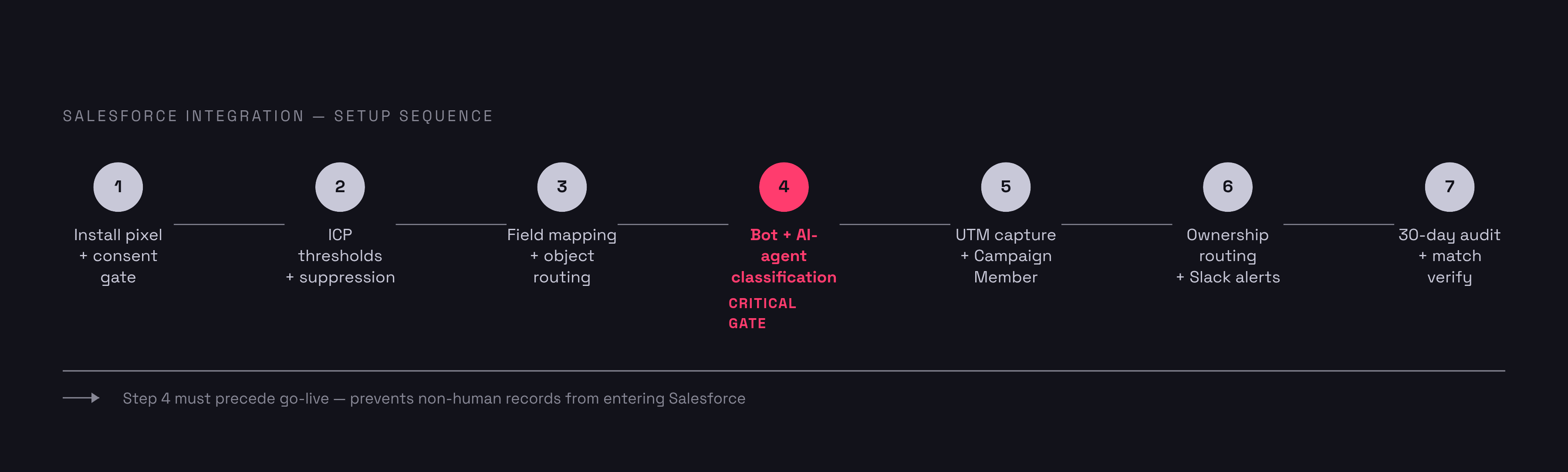
The first step is to install the identification pixel in the <head> of every page, including pricing, docs, and case studies. Use consent gating that fits the geography and check that the pixel fires before connecting Salesforce or creating any Lead. The second step is to define ICP thresholds for industry, employee count, revenue range, session depth, and high-intent visits. Suppression rules should keep existing customers, active deals, and competitors out of Lead or Contact.
The third step is field mapping and object routing. Configure email as the person deduplication key, then company domain for company matching, and set the paths into Lead, Contact on an existing Account, or Activity on an existing person. Confidence thresholds should set which matches can write automatically and which need review. The fourth step is to enable bot and AI-agent classification before go-live, preventing non-human Lead creation and excluding automated sessions from the match-rate denominator.
The fifth step is attribution plumbing at session start. Capture UTM parameters and ad platform identifiers, populate Lead Source and the relevant Campaign fields, and configure Campaign Member creation. The sixth step is ownership routing, with identified records assigned to the Account owner where applicable and Slack or Teams alerts delivered with behavioral context attached. Validate the Salesforce records before alerting reps.
The seventh step is a 30-day quality audit before the team scales up. Export and deduplicate identified records, check email deliverability and current role for a sample, and make sure non-human sessions are kept out of both the identified-person numerator and the human-visitor denominator. Work out the person-level and company-level rates separately using the records that reached Salesforce. That establishes whether the integration produces usable CRM evidence.